The Limits & Copy campaign features
In this update, we’re introducing:
- The Limits feature to allow you more visibility and control over the app’s usage limits.
- The Copy campaign feature to help you save time on the campaign setup.
Limits
Limits is a new feature that allows you to set specific usage boundaries, track and prevent exceeding allocated resources, and maintain the app’s overall smooth operation.
As your business needs grow, you can upgrade the limits, and also set up notifications to alert your team when usage is approaching predefined thresholds. This way, you avoid unexpected costs, and ensure your campaigns run reliably without interruptions.
Limits are set by default depending on the plan, and the Limits dashboard allows you to regularly check the usage dashboard, stay updated on current consumption and take necessary actions to stay within limits.
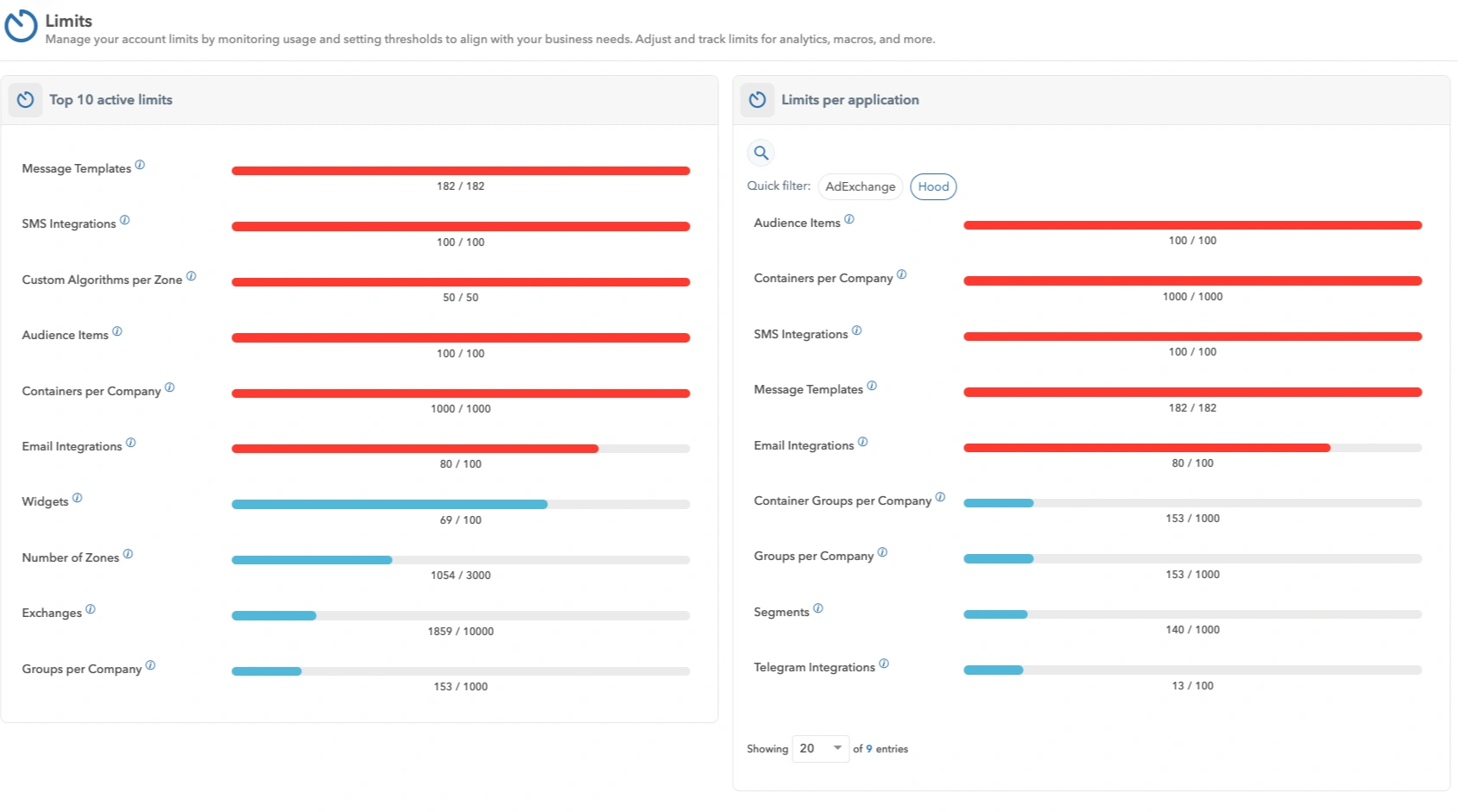
Limits dashboard
Also, for more control, you can assign team members to receive notifications when usage approaches or exceeds the set limits, ensuring prompt responses.

Email alerts configuration
To learn more about the Limits feature, check out the Limits docs for detailed guidance and our Limits blog.
Copy campaign
The new Copy campaign feature within HoodEngage’s Campaigns module allows you to duplicate existing campaigns, edit prefilled fields, and therefore save time on the new campaign setup process.

Copy campaign feature
For more details, check our Campaigns docs.